
SLATE Bug/Request list #1
Forums › 💬 Slate Sequencer › ⚙️ Support › SLATE Bug/Request list #1
- This topic has 0 replies, 2 voices, and was last updated 10 years, 5 months ago by
Gavalakis.
-
AuthorPosts
-
April 20, 2016 at 9:28 am #21550
magicpotato
ParticipantHello,
We tested SLATE today and I found bug and things to be improved.1. Unintended key values changing if value is negative when entering GamePlay or Launched of Unity3d.
When I trying to interpolation from -19 to -49 (difference is 30) for rotate of a ShotCamera on DirectorCameraTrack,
Then It interpolated from 341 to -49. (difference is 390)
Or sometimes interpolated from -19 to 311. (difference is 330)2. Incompletion CameraShot’s first key modifying.
The first key can’t be modified.
But the key’s tangent type(Auto, Smooth, Flat, Broken) can be changed. But it’s not saved.
I want to edit the first key value/tangent type and expect it affected to linked ShotCamera/GameObject.3. I need a property filter on a curve editors or key selector context menu. (Both of Inspector and Slate window)
It’s impossible to select a key that I intended when keys are placed on same position or similar values.
I attached max’s curve editor screen shot.
[attachment file=”242″]And key selector context menu is similar with Layer selector on a canvas of the Photoshop.
4. I need to change current preview position of a timeline on a Curve Editor of a Inspector.
I can change that on SLATE window timeline header. But I can’t do same thing on a Curve Editor of Inspector of a Unity3d.
It’s uncomfortable to decide values exactly on curve editor of Inspector without control preview position on the same area.Cheers!
April 20, 2016 at 11:34 pm #21555Gavalakis
KeymasterHey,
Let me address the questions/issues in order.
1. If you are using Unity 5.4 at the moment there is an issue due to a change they made in 5.4. I have already submitted a fix to that. In Unity 5.3 this should work fine. Are you on Unity 5.4?
2. Within the preferences (top right gear icon), there is an option to “Auto-Key Frame Zero”. When this is enabled, time 0 (meaning the first key) is automatically keyed to the current values of the object. This is mostly a convenience preference. If turned off, you will be free to change the key, but when you revert/exit from the clip the shot will not reflect the first key.
With that said, and because camera shots are special, in the new version the first key will be free to alter in both cases and as you expect, it will affect the linked shot’s gameobject correctly. So basically, this is now fixed to work as expected 🙂
3. I will take a look at implementing separate properties filter for curve editors in the next version. I originally thought of not splitting the x,y,z etc respectively, for convenience and simplicity.
Can you please expand a bit on the context menu filtering part though?4. Do you mean a way to scrub/set time of the cutscene within the inspector of a clip? If so, yes I will add this in the next version as well 🙂
Let me know.
Thanks!April 21, 2016 at 3:53 am #21554ParticipantHi!
1. That problem occurs with Unity3d 5.3.4f1. And SLATE version is latest (unitypackage size is 345,404bytes)
And I can’t find version information SLATE window or txt file.2. For a while, I will use that preference. And I expecting new version 🙂
3. I agree with your original thought.
But I think some case If x,y,z values have big gap, some curve will hard to edit exactly
For example, if x 0~1, z -1000~1000 then It will be hard to edit x value on a CurveEditor.
But sometimes want to see 3 properties like your thought.
So If you choose to make the filter, That need some options (ex: All, Filtered…)
You may reference 3dsMax’s curve editorAnd the context menu is this.
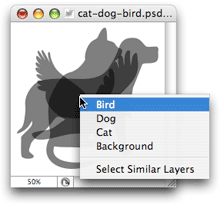
You can reference various layer selector on http://www.elated.com/articles/selecting-layers-in-photoshop/4. Yes! This!
[attachment file=”SLATE-previewPosition.png”]Feel free to discuss any issue with me.
Thanks!April 21, 2016 at 8:01 am #21553KeymasterHey 🙂
1. I just tried and created a shot then animated it’s Y value to rotate from 0 to -900. Even though in play mode the values show positive because they are converted to quotations (by Unity), the animation of the camera remains the same as it was in editor mode. Can you please give me an exact reproduction case to see?
2. 🙂
3. I will take a look at implementing the ability to see the different components of a vector separately. Regarding the context filter, I am aware that you meant of this feature in photoshop, but I am not sure where you would like to see this happen in Slate. Let me know.
4. Alright. Will add this soon as well.
Let me know.
( By the way, I use Photoshop and Softimage extensively (www.nuverian.net) 🙂 )
April 22, 2016 at 4:18 am #21552ParticipantHi 🙂
1. It’s bug related with the Auto Key Frame 0. This is reproduce steps.
1) Make rotate.y curve from -19 to -49 (ShotCamera GameObject.transform.rotate.y is -19)
2) Play & Stop (ShotCamera GameObject.transform.rotate.y is 341)
3) Sometimes SLATE overwrite Auto Key Frame 0 with original GameObject ShotCamera. (Or with little rotate.y changes like 341 to 341.01)
So, KeyFrame 0’s y will be changed from -19 to 341. But KeyFrame 1 didn’t be changed.
4) It’s range will 341 to -49[attachment file=”repro1.png”]
[attachment file=”repro2.png”]2. 🙂
3. That’s where over a KeyPoints on a CurveEditor in Inspector
4. 😀
5. <NEW> [Edit Key] box shows wrong value. I think is latest value.
[attachment file=”currentValue.png”]Thanks!
April 25, 2016 at 9:11 pm #21551KeymasterHey,
Sorry for the late replies.
As for the first point, I don’t think it will exist in the new version since the first key in camera is now fixed to works as we discussed earlier 🙂
I will take a look at the rest of the suggestions and see what I can do.
Thanks! -
AuthorPosts
- You must be logged in to reply to this topic.
